VAMPIRE – validate e-invoices in PHP and JavaScript
VAMPIRE is a validator for e-invoices in the XRechnung, ZUGFeRD, Factur-X and Peppol BIS formats. It checks them against the official validation rules and, unlike the KoSIT validator, needs no Java to do so. Your invoices stay with you: VAMPIRE PHP checks on your web server, VAMPIRE JS on a server with Node.js or right in the browser, and no invoice is sent to an outside service. We have measured how closely VAMPIRE matches the official KoSIT validator, and the figures are on this page. VAMPIRE PHP is free, and you can buy VAMPIRE JS in the shop on invoicePress.de.
To our knowledge, VAMPIRE PHP is the only tool that runs the official validation rules for e-invoices completely in pure PHP. VAMPIRE JS brings the same rule packages to pure JavaScript. Neither needs Java or an extra process, and the invoice never leaves your system.
Evidence: 220 of 220 invoices for which VAMPIRE and the official KoSIT validator reached the same result, measured on October 9, 2026.
253 of 253
invoices for which VAMPIRE JS and VAMPIRE PHP produced exactly the same validation report
measured on October 9, 2026
220 of 220
invoices for which VAMPIRE and the official KoSIT validator reached the same result
measured on October 9, 2026
350 of 350
checks of 50 ZUGFeRD invoices against seven versions each, in which VAMPIRE JS reached the same result as the official KoSIT validator
measured on October 9, 2026
141,988
lines of the positive validation report from 144 invoices, without a single difference between VAMPIRE PHP and VAMPIRE JS
measured on October 9, 2026
More than “accepted” or “rejected”: three features for your proof
An ordinary validation report only tells you what is wrong with an invoice. VAMPIRE also shows you what was checked and what is fine, and on request it checks a ZUGFeRD invoice against every version of the format. All three features are part of both editions, VAMPIRE PHP and VAMPIRE JS, at no extra cost.
Positive validation report
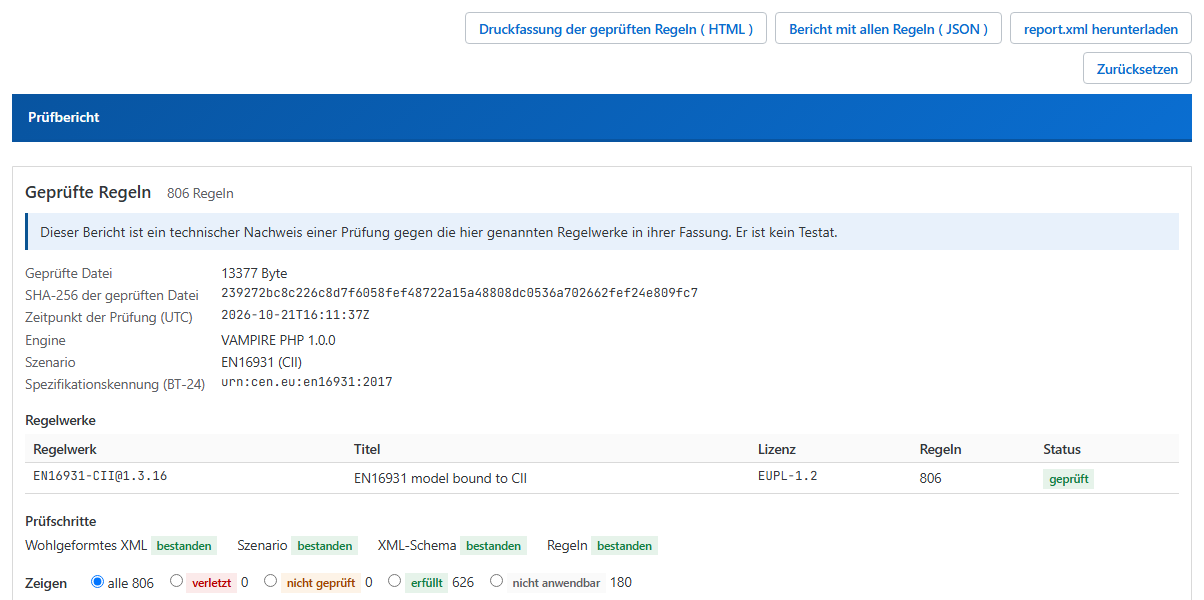
An ordinary validation report only lists the rules that were broken. The positive validation report of VAMPIRE lists every rule of the rule sets used, with its result: passed, failed, not applicable or not checked. It also names each rule set with its version, the time of validation and the SHA-256 checksum of the file. VAMPIRE PHP and VAMPIRE JS both deliver it.
What you get: you document not only that no error was found, but what was checked. It is technical evidence, not a certification.
List of checked rules
You export the list of all checked rules as a file for software (JSON). In the WordPress plugin eInvoice Validator for VAMPIRE you also get a printable list as an HTML file that your browser saves as a PDF. In the example below there are 806 rules of the EN 16931 rule set for CII: 626 passed, 180 not applicable, none failed.
What you get: you file the list with the invoice or pass it on to your software, your supplier or your auditor.
Multiple validation across all versions
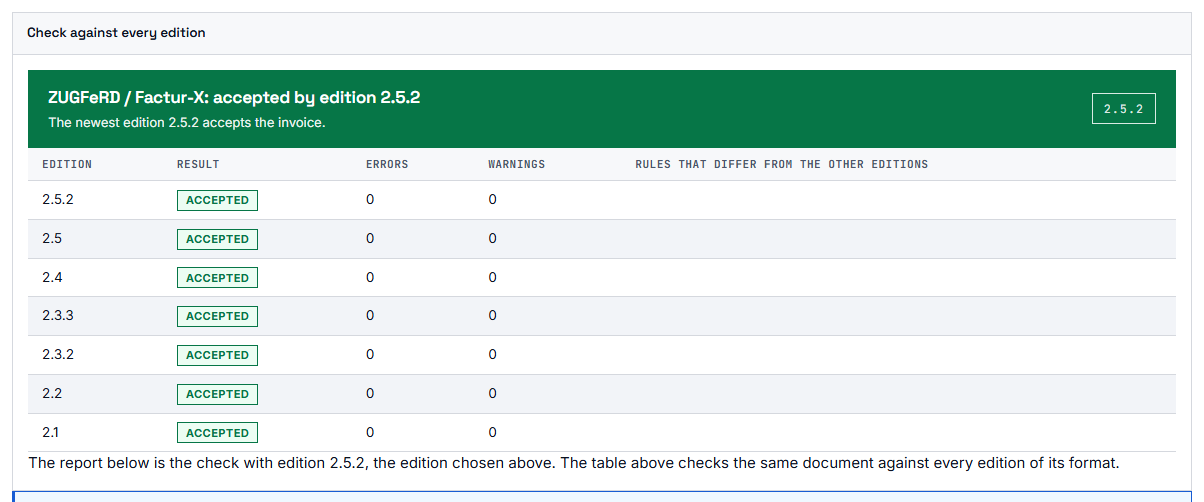
A ZUGFeRD or Factur-X invoice does not say which version it was made for. VAMPIRE therefore checks it against every version on request: as a cascade from the newest version down until one accepts the invoice, or as a full matrix with one row per version. In VAMPIRE the versions are just data; you set nothing up for this.
What you get: in our measurement of 50 ZUGFeRD invoices, 17 were accepted under the rules of some versions and rejected under others. You see at once which version accepts the invoice.
Positive validation report with the list of checked rules.
Multiple validation: the result for each ZUGFeRD version.
Two editions, the same validation report
VAMPIRE comes in two editions. Both check against the same rules and produce the same validation report for the same invoice. All you decide is where you want to run the check.
VAMPIRE PHP runs in any PHP process from PHP 8.2 on, including ordinary shared hosting. It needs no Java and starts no other program. This lets you check e-invoices even where you cannot run a server with Java. VAMPIRE PHP is free software under the GPL-2.0-or-later, and its source code is public on GitHub and Packagist.
VAMPIRE JS runs in Node from version 18 on and in the browser. It even runs in an HTML file that you open on your computer with a double click, with no web server at all. That way you can check an invoice right where it is open, without uploading it anywhere. VAMPIRE JS is a paid product that you buy in the shop on invoicePress.de.
VAMPIRE PHP free, runs in PHP 8.2+ without Java
VAMPIRE JS in the shop, runs in Node and the browser
Rule packages free, included in both editions
Two editions, the same rule packages: VAMPIRE PHP is free, VAMPIRE JS is available in the shop, and both contain the rule packages.
Both editions read the same rule packages. A rule package holds the validation rules of one format in one version, for example the rules of XRechnung 3.0.2. The publishers of the formats release their validation rules as Schematron files, a language for describing validation rules for XML, and VAMPIRE translates these official files by machine into its rule packages. We measured on 253 invoices that both editions really do produce the same report. How we measured this is described in the section "How it was measured" at the end of this page.
What VAMPIRE checks
VAMPIRE checks an invoice in four steps. First, it checks whether the file is valid XML. Second, it checks whether the structure of the file matches the schema of its format, that is, whether every element is where it belongs. Third, it checks the syntax rules of EN 16931 for the XML form, UBL or CII. Fourth, it checks the business rules of the matching rule set; these are the content rules the publisher has defined for the format. VAMPIRE reads from the invoice itself which rule set applies. At the end you get the result: the invoice is either accepted or rejected.
1 · XML Is the file valid XML?
→
2 · Schema Is the structure right?
→
3 · Business rules of the matching rule set
→
Result accepted or rejected
How VAMPIRE checks an invoice: first the XML, then the schema, then the business rules, and finally the result.
VAMPIRE knows these formats:
EN 16931 in UBL and in CII
XRechnung 3.0.2 in UBL and in CII
Peppol BIS Billing 3.0.21
ZUGFeRD and Factur-X in the profiles MINIMUM, BASIC WL, BASIC, EN 16931 and EXTENDED
The page Rule packages lists every rule set with its version, its origin and its license. All rule packages are included in both editions of VAMPIRE and cost nothing extra.
On request, VAMPIRE also writes the report in the format of the KoSIT validator. Tools that already read that format can read VAMPIRE's report as well.
What the positive validation report shows
An ordinary validation report names only the rules an invoice violates. The positive validation report goes further: it lists every rule of the rule sets that were used, each with its result. That result is "satisfied", "violated", "not applicable" or "not checked". The report also names each rule set with its version, the time of the check, and the SHA-256 checksum of the checked file, a digital fingerprint by which the file can be recognized later. If VAMPIRE could not run a rule, that rule appears as "not checked" together with the reason, and it is never counted as satisfied.
This gives you technical evidence. It shows that a specific invoice was checked against a specific rule set in a specific version. It is not an audit opinion and not a legal confirmation.
On October 9, 2026, we checked five accepted invoices from our own test corpus with the KoSIT validator 1.6.3 and with Mustang 2.25.0 and examined the reports. For an accepted invoice, neither tool lists the checked rules one by one with their result; both name only the rules that fired. Whether another configuration or another tool by the same makers can do so is something we have not measured.
Why VAMPIRE checks several versions
ZUGFeRD and Factur-X exist in several versions of the specification. An invoice names its profile, for example EN 16931 or EXTENDED, but not the version it was created for. This is more than a formality: when we measured 50 ZUGFeRD invoices, 17 were accepted under the rules of some versions and rejected under the rules of others.
So VAMPIRE works step by step. It first checks the invoice against the rules of the newest version. If the invoice is accepted, the check is done. If it is rejected, VAMPIRE checks it against the rules of the next older version, and so on. The version chosen is therefore the newest one under whose rules the invoice is accepted, and the result names that version. If no version accepts the invoice, VAMPIRE shows the report of the newest version, because the invoice is then faulty under every version, and the newest one is the authoritative one. You always see what the invoice was checked against and can judge for yourself whether that version suits your purpose. XRechnung is different: there, the report names the version that was valid on the invoice date.
1 · Newest version checked first
→
2 · Accepted? yes: done · no: next older version
→
Result names the chosen version
How VAMPIRE chooses the version: from the newest downwards until the invoice is accepted under the rules of one version.
If you want the full picture, VAMPIRE checks every version one by one on request. The result is then a table with one row per version, and you see at a glance under which versions the invoice is accepted and under which it is rejected. In the playground, this check will soon run right in your browser.
How to get VAMPIRE
VAMPIRE PHP is free. Install it from Packagist with a single command, composer require invoicepress/vampire-php. The source code is on GitHub. The steps are in the Composer guide, and everything else is in the documentation for PHP.
VAMPIRE JS is available in the shop on invoicePress.de. How to add the package to your project is described in the npm guide, and everything else is in the documentation for JavaScript.
In WordPress, the free plugin eInvoice Validator for VAMPIRE brings validation with VAMPIRE PHP to your website. The plugin is described on invoicePress.de.
The quickest way to start is VAMPIRE PHP: it is free, needs no sign-up, and one command is all it takes.
220 of 220 invoices for which VAMPIRE and the official KoSIT validator reached the same result (measured on October 9, 2026): We checked 253 test invoices with VAMPIRE and with the official KoSIT validator. Both could match 220 of them to a rule set, and for all 220 both reached the same result, that is accepted or rejected. For 215 of these 220 invoices, exactly the same rules fired as well; for the other five, the difference comes from the version of the EN 16931 rules for CII, because the KoSIT validator ships version 1.3.15 and VAMPIRE ships version 1.3.16. Neither validator could match the remaining 33 invoices to a rule set. Date of the measurement: October 9, 2026.
253 of 253 invoices for which VAMPIRE JS and VAMPIRE PHP produced exactly the same validation report (measured on October 9, 2026): We checked 253 invoices with VAMPIRE JS and with VAMPIRE PHP and compared the two reports for each invoice. We compared the detected rule set, the result (accepted or rejected), the results of the four check steps (well-formedness, schema, syntax rules, business rules), all 184 findings with text and location, and the report in the format of the KoSIT validator byte for byte. The report was the same for all 253 invoices. Of these invoices, 144 come from our own test corpus and 109 from the test suite of XRechnung 3.0.2.
350 of 350 checks of 50 ZUGFeRD invoices against seven versions each, in which VAMPIRE JS reached the same result as the official KoSIT validator (measured on October 9, 2026): We checked 50 ZUGFeRD invoices against seven versions of the specification, from 2.1 to 2.5.2. That gives 350 individual results, and each of them came out the same as in the official KoSIT validator with the configuration of that version, in Node and in the browser alike. 17 of the 50 invoices are accepted under the rules of some versions and rejected under the rules of others; that is exactly why checking against several versions is worthwhile. The measurement was taken on October 9, 2026 against the KoSIT validator reference matrix of September 24, 2026.
141,988 lines of the positive validation report from 144 invoices, without a single difference between VAMPIRE PHP and VAMPIRE JS (measured on October 9, 2026): We checked 144 invoices with the positive validation report switched on, in VAMPIRE PHP and in VAMPIRE JS. The positive validation report holds one line per checked rule, 141,988 lines in total. All 141,988 lines matched, each with rule set, result, severity, number of checked places, and text.
5 invoices without errors whose validation reports from the KoSIT validator and from Mustang we examined (measured on October 9, 2026): On October 9, 2026, we checked five accepted invoices from our own test corpus with the KoSIT validator 1.6.3 and with Mustang 2.25.0 and examined the reports. For an accepted invoice, neither tool lists the checked rules one by one with their result; both name only the rules that fired. Whether another configuration or another tool by the same makers can do so is something we have not measured.
VAMPIRE PHP free, VAMPIRE JS in the shop.
VAMPIRE PHP and all rule packages are free and available on GitHub and Packagist. You can buy VAMPIRE JS in the shop on invoicePress.de.